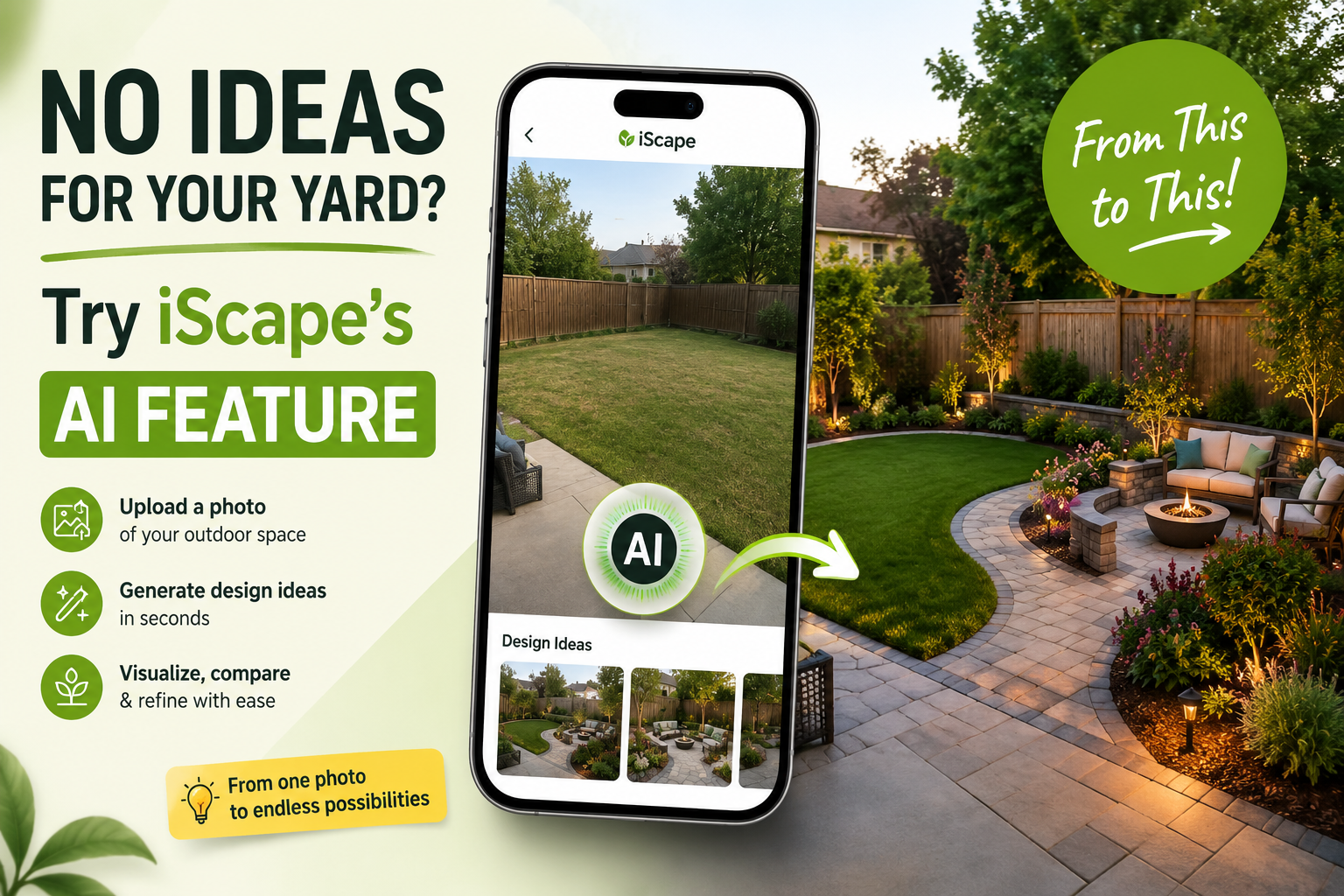
You know your yard needs a change, but you have no idea what that change should look like. The patio feels too small. The front yard looks unfinished. One corner is completely empty. The planting beds lack structure. You may have saved dozens of landscape photos, but none of them show how those ideas would work around your home. This is where iScape’s AI feature can help.
Instead of beginning with a blank canvas, you can upload a real photo of your yard and generate an initial landscape design direction. The concept can help you see possible plants, pathways, patio areas, furniture, lawn, and other outdoor elements directly within the space you want to improve. It does not make every final decision for you. It gives you something more useful than a folder of unrelated inspiration photos: a starting idea based on your actual yard.
Why Is It So Hard to Decide What to Do With a Yard?
Most homeowners do not struggle to recognize a yard problem. They struggle to picture the solution. You may know that you need:
- More privacy
- A better seating area
- Less lawn to maintain
- More curb appeal
- A safer walkway
- More color
- Space for children or pets
- Better use of an empty corner
However, each improvement affects the rest of the yard. A larger patio may reduce the lawn. Privacy planting may block sunlight. More flower beds may require more maintenance. A new path may divide the available space in the wrong place. Looking at finished landscapes online can provide inspiration, but those yards have different dimensions, houses, climates, and existing features. iScape’s AI feature helps you begin with your own outdoor space instead.
What Does iScape’s AI Feature Do?
The feature allows you to upload a photo of an outdoor area and generate an initial landscape concept faster. You can begin with a photo of:
- A front yard
- A backyard
- A patio
- A garden
- A side yard
- A pool area
- An outdoor entertaining space
- A client’s property
The generated concept can provide a possible direction for planting, lawn, pathways, patios, outdoor furniture, borders, and other landscape elements. Previously, users could upload a photo and place these elements manually in iScape. The AI feature speeds up the early stage by helping create a first concept before every item has been selected and positioned. This can be particularly useful when you do not know where to begin.
Start With One Clear Photo
A useful design starts with a useful photo. Take the image during daylight and stand where you can see most of the area you want to redesign. Keep the camera reasonably level and include permanent property features such as:
- Doors and windows
- Fences
- Existing trees
- Driveways
- Walkways
- Patios
- Steps
- Garden beds
- Utility equipment
Remove hoses, bins, toys, tools, and temporary furniture when possible. These items can make the space harder to evaluate. For a front-yard redesign, include the house entrance, lawn, driveway edge, front path, and any trees or beds that will remain. For a backyard project, try to show the patio, lawn, fence lines, doors, existing planting, and the main routes people use. A wide photo provides more context than a close-up of one small corner.
Generate a First Landscape Direction
Once the photo is uploaded, iScape’s AI feature can help create an initial design concept. This gives you something specific to react to. For example, the generated direction may show:
- A larger patio beside the house
- Planting along an empty fence
- A curved front walkway
- A smaller, more defined lawn
- Privacy planting around a seating area
- A garden bed in an unused corner
- Furniture arranged within the patio
- A clearer connection between outdoor zones
The first result does not need to be perfect to be useful. You may dislike the size of the patio but like the location. You may want fewer plants but prefer the suggested bed shape. You may decide that the yard needs more open space than the concept provides. These reactions help turn uncertainty into clearer decisions.
See Ideas in Your Actual Outdoor Space
One of the main benefits of starting with a yard photo is context. A landscape idea may look attractive online but feel completely different when placed beside your house. Using the actual property photo makes it easier to consider:
- Whether a patio dominates the lawn
- Whether planting blocks a window
- Whether a pathway follows a practical route
- Whether a seating area has enough privacy
- Whether the design complements the house
- Whether the yard feels open or crowded
- Whether important existing features still fit
Homeowners who want to compare several approaches can also use iScape to try multiple yard ideas before starting the project. Instead of committing to the first direction, create different versions and compare them in the same space.
Compare Different Uses for the Same Yard
Suppose your backyard currently has a small patio, a rectangular lawn, and an empty fence line. You want better seating, more privacy, attractive planting, and enough open space for a dog. There is no single correct solution. You could explore several directions.
An Outdoor Living Yard
This version may include a larger patio, dining furniture, lounge seating, lighting, and simple planting around the edges. It may suit someone who regularly entertains guests but does not need a large lawn.
A Garden-Focused Yard
This direction may use smaller seating areas, layered planting beds, flowering plants, and a pathway through the yard. It may provide more visual interest but require additional maintenance.
A Low-Maintenance Yard
This version may reduce the lawn, repeat a smaller number of dependable plants, simplify bed shapes, and use more mulch or hardscape. It may suit a homeowner who wants a polished yard without frequent gardening.
A Family and Pet-Friendly Yard
This design may keep a central lawn, move delicate planting to the edges, provide shade, and use durable pathways between high-traffic areas. Seeing these options in your own space can make the tradeoffs easier to understand.
Refine the Idea Instead of Accepting It Immediately
A generated concept should be treated as the beginning of the design process. Once you have a useful direction, continue refining it in iScape. You may decide to:
- Make the patio smaller
- Keep more lawn
- Change the shape of a garden bed
- Move seating into the shade
- Add a path to the gate
- Reduce the amount of planting
- Add privacy on one side only
- Change the hardscape material
- Remove features that exceed the budget
The AI feature helps you overcome the blank-page problem. Refinement helps make the design work for your space, routine, and priorities.
Use the Concept to Set Priorities
A design idea may include more work than you can complete at once. That does not mean you need to reject the entire concept. Use it to identify what matters most. Ask:
- Which problem needs to be solved first?
- Which improvement will have the greatest daily impact?
- Which features affect future construction?
- What can be added later?
- Which ideas do not fit the current budget?
For example, drainage and hardscape may need to come before planting. Major trees may need to be placed before smaller beds are developed. Patio construction may need to happen before furniture and lighting are selected. Homeowners managing a limited budget can read how to plan a yard makeover without overspending.
How Landscape Professionals Can Use the Feature
Homeowners are not the only people who struggle to communicate a design direction. Landscape professionals often hear unclear client requests such as:
- “We want it to look finished.”
- “Give it more curb appeal.”
- “Make it modern.”
- “We need something low maintenance.”
- “We do not know what we want.”
- “Show us what is possible.”
iScape’s AI feature can help turn the property photo into an early visual discussion. Instead of expecting the client to imagine every detail, the professional can present a starting direction and ask more useful questions:
- Do you want more or less lawn?
- Should the patio be larger?
- Is this amount of planting manageable?
- Does the style feel too formal?
- Should privacy be the main priority?
- Which part of the concept matters most?
Move From a General Idea to a Better Client Conversation
Not every client inquiry is ready for a full design. A homeowner may initially ask for “a better backyard” without knowing whether that means new planting, a larger patio, more privacy, or a complete redesign.
An early concept can help confirm the scope before the professional invests significant time in:
- Site measurements
- Detailed plant selection
- Material specifications
- Drainage planning
- Grading
- Cost estimates
- Installation details
- Final proposals
The visual concept does not replace professional expertise. It helps the client communicate what they like, dislike, and expect. This can reduce large changes later in the process. Read more about reducing landscape design revisions before project approval.
Connect the Visual Concept With a Proposal
For professionals, iScape can support more than the initial yard image. Once the design direction is discussed and refined, it can be connected to a broader project workflow involving materials, descriptions, pricing, and client-facing proposals. A practical process may include:
- Upload the property photo.
- Generate an initial design direction.
- Review the concept with the client.
- Refine the layout.
- Confirm plants and materials.
- Add project details and pricing.
- Present the design with the proposal.
The visual helps the client understand the proposed result. The proposal explains the work required to achieve it.
What the Generated Idea Cannot Confirm
A design concept can show what a yard might look like, but it cannot confirm every practical detail. Before buying materials or beginning construction, check the following.
Exact Measurements
A patio or pathway may appear correctly sized in the image, but real measurements are needed to confirm furniture clearance, walkway width, material quantities, property setbacks, and installation requirements.
Plant Suitability
A plant that looks appropriate in the concept may not suit the local climate, sunlight, soil, water availability, or maintenance level.
Its mature height and width must also be considered. A small shrub may eventually block a window or spread into a walkway.
Drainage and Grading
A photo may not show where water collects after heavy rain.
Paths, patios, retaining walls, lawns, and planting beds must work with the site’s real slope and drainage conditions.
Underground Utilities
Utility lines should be identified before installing trees, fences, irrigation, patios, or other features that require digging.
Permits and Construction Requirements
Retaining walls, pools, decks, electrical work, outdoor kitchens, drainage changes, and larger structures may require permits, engineering, or professional installation.
Before approving a final direction, use this 10-point landscape design review checklist.
Plan the Whole Yard Before Building One Part
You do not need to complete every part of the design at once. However, planning the full yard first can prevent expensive conflicts later.
For example, installing a new garden bed without considering the future patio could lead to removal and rework. Adding a path before checking drainage may create water problems. Planting trees in the wrong place may limit future construction. A phased plan could follow this order:
- Drainage, grading, and site preparation
- Patios, pathways, and retaining walls
- Trees and large shrubs
- Smaller planting and lawn improvements
- Lighting, furniture, and decorative details
The iScape guide to planning landscaping in phases without losing the final look explains how to divide a larger vision into manageable projects.
Frequently Asked Questions
Can iScape’s AI feature generate a design from one photo?
The feature allows users to begin with a real photo of an outdoor area and generate an initial landscape design direction. Users can then review and refine the concept in iScape.
What type of photo should I upload?
Use a clear, wide photo taken during daylight. Include permanent features such as the house, fences, trees, existing hardscape, lawn, and property boundaries.
Do I need to know what design style I want?
No. The feature can be useful when you do not have a clear design idea. However, knowing your main goal, such as privacy, entertaining, low maintenance, or curb appeal, can help you evaluate the result.
Can the generated concept be changed?
Yes. The first concept should be treated as a starting point. You can continue refining the layout and outdoor elements in iScape.
Does the feature replace a landscape professional?
No. It helps with inspiration, visualization, and early communication. Complex projects may still need a landscape designer, landscape architect, engineer, arborist, irrigation specialist, or contractor.
Can landscape professionals create proposals in iScape?
iScape’s professional tools can support proposals, project descriptions, pricing, itemized information, and client-facing documents.
No Yard Idea? Start With the Yard You Already Have
You do not need a complete landscape vision before beginning.
Start by taking one clear photo of the outdoor space. Use iScape’s AI feature to explore a first design direction. Review what works, remove what does not, and compare different possibilities before committing to plants, materials, or labor.
The feature does not remove the need for planning. It makes planning easier to begin.
Upload your yard photo, generate a starting idea, refine the concept in iScape, and move forward with a clearer vision.